Hello, today
I am going to
talk about Podcasting Resources of Apple. I have read an article that you can
find in the offical Apple webpage.
With Apple,
there are many free podcast that you can download. You just have to go to the
Itunes store and then select podcasts in there. You can access the store by
clicking on the Itunes store option on the right top of the page.
If you want to
find the most popular podcasts you have to browse the Podcasts page to see the
ones that are selected by the Itunes editors. If not, you can use the Itunes
search fiel in the upper-right corner.
iTunes displays the Top Episodes and Top
Podcasts based on a combination of recent subscriptions, downloads, and
customer reviews. Click the header at the top of each chart to see the top 200
podcasts or episodes. To see the most popular podcasts by subject just go the
desire category from the Podcasts pop-up menu.

If you want to find more podcast related to
the one you like look who is the creater and then click on it. You’ll find a
link that leads to a page containing all of them.
Playing
podcasts:
For listening
to the podcasts you can
Li Stream an episode directly from the
iTunes Store just by clicking it or download it to your iTunes library.
It is your decision to hear the podcast faster
of slower. You have to use the Podcasts app speed indicator.
To view a video podcast that you downloaded,
select Podcasts from the Library pop-up menu and click the podcast. A list of
downloaded episodes appears, and you can double-click a title to begin
watching.

iTunes also features text-based podcasts. You
can open these PDF or ePub files on your computer, or use the Apple iBooks app
on your iPod touch, iPhone, or iPad.
For finishing the podcast in another time, cliick pause in iTunes or on
your iPod, iPhone, iPad, or Apple TV. When you’re ready to resume, press Play.
With Icloud, you can start listening on one device and finish on another
Note that generally, such errors are related to the feed set up by the
podcaster. In many cases, the episode will be available again in about a day.
If you listen to a lot of podcasts, the “Spoken Word” EQ setting
may enhance the sound quality for you. This EQ setting reduces bass frequencies
— especially handy for amateur podcasts, where mic pops and other noise might
otherwise distract.
Managing
Podcast Subscriptions
To keep
a steady stream of episodes playing, create a podcast playlist or create a
Smart Playlist that includes podcasts based on artist, genre, episode length,
and more.
New
episodes download automatically. You can choose whether the app begins playing
the newest or oldest unplayed episode. And since iCloud stores your
personalized stations, you’re always up to date on all your devices.
If you like
the auto-remove feature for most podcasts but want to keep all the episodes of
a particular podcast, you’re in luck. Select a podcast (at either the episode
or podcast level), Control-click or right-click the title, and choose Do Not
Auto Delete. iTunes holds on to the podcast’s episodes until you manually
delete them.
 Sharing
Podcasts
Sharing
Podcasts
You can also
share podcast where by a link or the whole playlist.
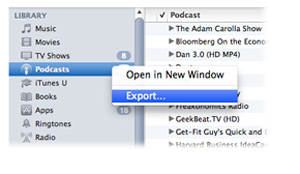
To export a
list of your subscriptions, first turn on the iTunes Sidebar by choosing Show
Sidebar from the View menu. Then right-click or Control-click Podcasts in your
library and select Export. Choose OPML as the format. (OPML is a generally
recognized format for sets of subscriptions.) Name the file and save it
wherever you want. At any time, you can reimport the file and iTunes will
subscribe you to all the podcasts inside. Or email it as an attachment to your
uninitiated pals.
BIBLIOGRAPY:
"Apple - ITunes - Podcasts." Apple - ITunes - Podcasts. N.p., n.d. Web. 04 Dec. 2013.
BIBLIOGRAPY:
"Apple - ITunes - Podcasts." Apple - ITunes - Podcasts. N.p., n.d. Web. 04 Dec. 2013.

No hay comentarios:
Publicar un comentario